Productivity & Personal Tools
jotty·page
Self-hosted app for checklists and notes with Markdown files, no database
- Community votes
- 0
- DR by Ahrefs
- 15 −1 (down) since last check
Brief: Ahrefs Domain Rating 17 Oct 2026, brief changed 9 Oct 2026.
jotty·page facts
- Website
- jotty.page
jotty·page metrics
| Metric | Value |
|---|---|
| Domain Rating | 15 −1 (down) since last check |
| Trust Flow | 24 no change since last check |
| Citation Flow | 22 no change since last check |
| Referring domains | 249 no change since last check |
| External backlinks | 1,127 no change since last check |
Brief: Ahrefs Domain Rating 17 Oct 2026, brief changed 9 Oct 2026. Brief topic: Computers/Programming/Languages (24). Brief: Majestic 3 Oct 2026, brief changed 3 Oct 2026. Link brief by Majestic. Trust Flow, Citation Flow and Topical Trust Flow are trademarks of Majestic-12 Ltd.
jotty·page domain, briefly
| Domain age | 1 year |
|---|---|
| Registered | |
| Expires | |
| Registrar | Namecheap Inc. |
| DNSSEC | Not signed |
A self-hosted app for managing checklists and notes using Markdown files stored in your own folder, with no database required.
About
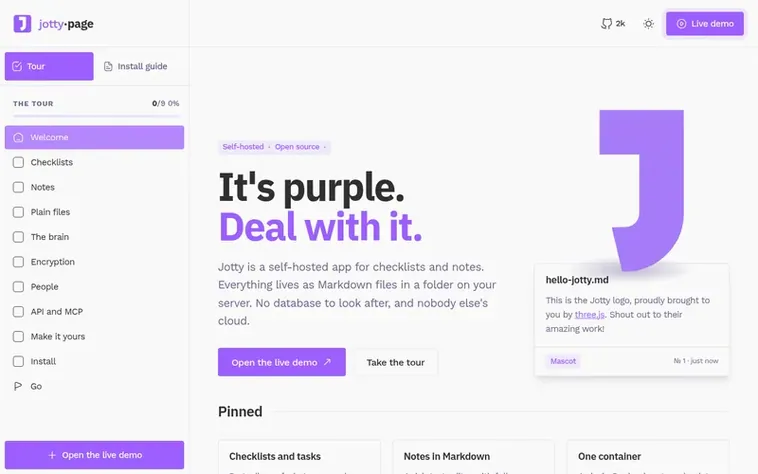
A look at jotty.page
Jotty is a self-hosted application designed for creating and managing checklists and notes. All data is stored as Markdown files in a folder on your server, eliminating the need for a separate database and keeping your information private.
The application supports both simple checklists with progress bars and full Kanban projects for task management. Notes can be created with a rich text editor featuring full Markdown support, tags, bi-lateral linking, and diagrams. Users can connect notes and checklists together using wikilinks and mentions, with a 3D brain visualization to map relationships.
Jotty offers encryption options including XChaCha20-Poly1305 with passphrases or RSA-4096 PGP key pairs. Multi-user support includes sharing capabilities, OIDC and LDAP authentication, MFA, and a REST API. The application can be deployed as a single Docker container and is fully open source.
In brief
- Kanban projects with custom statuses and time tracker
- Rich text editor with Markdown support
- Bi-lateral linking and wikilinks between notes and checklists
- 3D brain visualization of connected notes
- XChaCha20-Poly1305 and PGP encryption
- Multi-user support with OIDC and LDAP authentication
- REST API with OpenAPI specification
- MCP server integration with Claude and Cursor
- Audit log and admin panel
- Calendar view for due dates
Compare and explore
Questions
How do I install Jotty?
Docker is the easiest way to install Jotty. You need to create a docker-compose.yml file, make the required folders (data, config, cache), and then start it with docker compose up -d. The application will be accessible at localhost:1122 where you can create your admin account. Alternative installation methods include Proxmox community scripts and Unraid templates.
How is data stored in Jotty?
Every checklist and note is stored as a Markdown file, while users and settings are stored as JSON files. All data sits in a single data folder on your server. You can backup your entire instance by copying this one folder, and you can also add your existing Markdown files to the folder and Jotty will use them automatically.
What encryption options does Jotty support?
Jotty supports two encryption methods. You can encrypt notes with XChaCha20-Poly1305 using a passphrase that is never stored, or you can use your own PGP keys with RSA-4096 key pairs. Encrypted files remain encrypted on disk until you purposely decrypt them, and you can even edit files while they remain encrypted on the server.
Can I integrate Jotty with AI tools like Claude or Cursor?
Yes, Jotty has an MCP server that allows Claude, Cursor, or any other MCP client to read your notes, check off items on your lists, and follow the links in your knowledge graph. The MCP server runs as a separate container and is entirely optional - if you don't run it, there's no AI integration and your instance runs exactly as before.
What authentication methods does Jotty support?
Jotty supports multiple authentication options including OIDC providers and LDAP. It also includes support for multi-factor authentication (MFA). Administrators can create accounts and manage active user sessions through the admin panel.
Find jotty·page online
Leave a review for jotty·page
no reviews of jotty·page yet. be the first.
reviews are free. none are bought. the reviews, briefly
Short reviews · Brief updates · Share briefly · Yours? Claim it · Report an issue
jotty·page has a free listing. The owner can unlock the full profile with a paid launch for $5:
- Founder story (locked)
- Milestones (locked)
- Demo video (locked)
- Dofollow website link (locked)
You might also read
-
0 votes. Log in to briefly vote for Notesnook
Notesnook
Privacy for everyone
-
0 votes. Log in to briefly vote for Kanboard
 Kanboard
Free and open source Kanban project management software
-
0 votes. Log in to briefly vote for 4ga Boards
 4ga Boards
Straightforward boards system for realtime project management
-
0 votes. Log in to briefly vote for dayGLANCE
dayGLANCE
Your day, at a glance